Aide
A macOS menu bar app that watches your Mac’s load and stays quiet until you cross a limit you set. Then the indicator changes color and the list shows only the apps behind it, with Pause, Restart and Kill one click away.
ZIP, 0.1 MB – fact sheet, screenshots, logo. Version 1.0, October 2026Fact sheet
- Developer
- Kirill Bush, inBuro (independent)
- Platform
- macOS 13 Ventura or later, menu bar app
- Current version
- 1.0, October 2026
- First release
- 1.0, October 2026
- Price
- 3 days free, then a $3.99 one-time license
- Distribution
- Direct download from the website
- Privacy
- Reads process load on this Mac only, no account
- Website
- aide.tinyapps.space
- Release notes
- aide.tinyapps.space/updates
- Press contact
- [email protected]
New in 1.0
- A ring with a dot in the menu bar. It stays grey while your Mac is within its limits, then turns orange and red as the load climbs past them
- A separate limit for CPU and for memory, each set by dragging a thumb on its bar
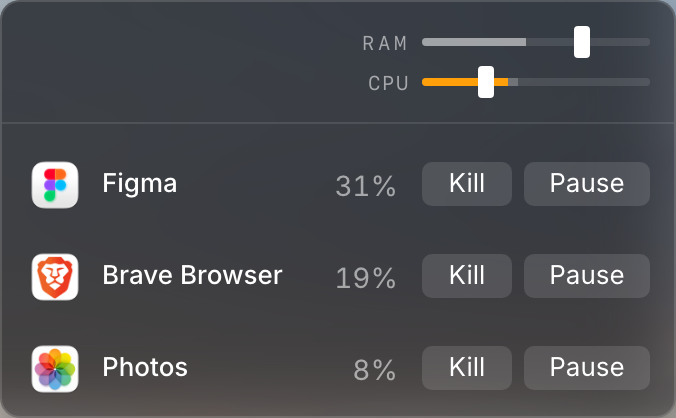
- Opens only when the load is over a limit, and lists only the apps behind it
- Pause and Resume in one click. A pause is reversible, and a paused row stays in the list until you resume it
- Starts at login
The full list is on the Updates page
What it does
A grey indicator in the menu bar, no notifications. It changes color only when the load crosses a limit you set
The list opens above the limit and shows your apps, not the hundreds of system processes
A separate limit for CPU and for memory, set by dragging a thumb on its bar
Pause is reversible and Resume brings the app back. Memory rows offer Restart, and Kill counts 3-2-1 first
An app whose memory keeps climbing is listed even while it is under the limit
Screenshots
Version 1.0 interface, PNG



Logo and colors

Placeholder: the final logo comes later
SVGThe name is one word: Aide, with a capital A
Why it exists
Activity Monitor shows everything the Mac is doing, and the person has to open it, sort a list of processes and find the culprit. Most menu bar monitors draw graphs all day and leave the action to the user. Aide takes the opposite approach: it stays quiet while the load is within the limits the person set, and when it crosses them, it lists only the apps behind the load. 1.0 shipped in October 2026. Every version is on the Updates page
Contact
Kirill Bush, [email protected]